Key Takeaways
- “Case Is Being Actively Reviewed” means a USCIS adjudicating officer is examining your application and documents.
- It does not guarantee an imminent decision. Cases can stay in this status for weeks or months.
- The next update could be an approval, a Request for Evidence (RFE), an interview notice, or even a denial.
- "Case Is Being Actively Reviewed" and "Case Is Still Being Processed" are two different status messages with different meanings.
- If your case exceeds the USCIS processing times for your form type, you can submit a service inquiry.
“Case Is Being Actively Reviewed by USCIS” means that an immigration officer has started examining your application. It confirms that your case has moved past the initial receipt stage, but it does not suggest you will get a decision right away.
What does “Case Is Being Actively Reviewed by USCIS” mean?
This status means a USCIS adjudicating officer has started evaluating your application. During this stage, the officer reviews all the documents you submitted, checks that you fully completed the form, and may run additional background or security checks.
This review can take anywhere from a few weeks to several months, depending on your form type and the field office handling your case.
“Case Is Being Actively Reviewed” does not mean an officer is literally reviewing your file at this exact moment. It means your case has entered the active review phase, and the adjudicator will get to it based on workload and caseload prioritization.
This YouTube video is hidden until you accept functional cookies.
To get email or text alerts when your status changes, Form G-1145 is a free USCIS form you can submit with your petition to set up notifications from the start.
Is “Case Is Being Actively Reviewed” a good sign?
Manifest immigration attorney Ana Gabriela Urizar says yes, as it generally means your case is moving forward. “Receiving this status indicates USCIS has completed the initial intake process, accepted your application, and assigned it to an officer for substantiate review,” she says.
That said, Urizar notes that this notice does not predict the outcome. “Cases in ‘actively reviewed’ status can result in an approval, an RFE, an interview request, or in some cases a Request for Evidence,” she explains. “I like to tell clients this is a confirmation that the adjudication process has begun, and it takes several weeks to complete for most people.”
How to check your USCIS case status online
You have two ways to check your status: the quick-access tool or a full MyUSCIS account.
Option 1: USCIS Case Status Online Tool (quickest)
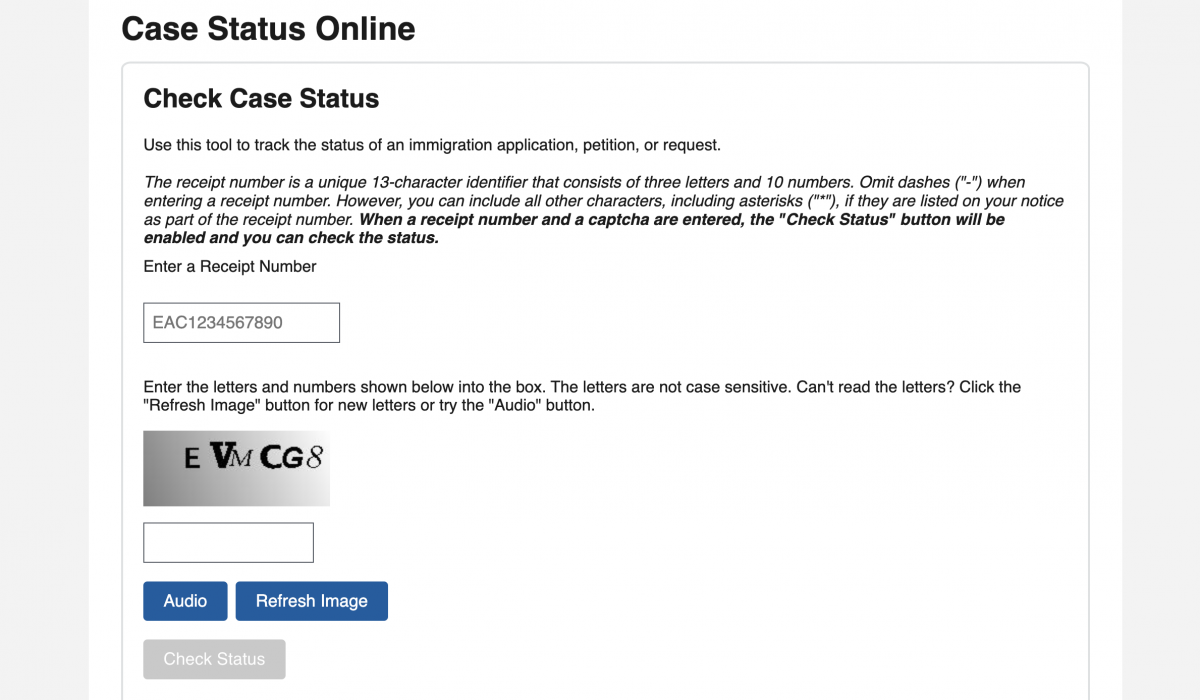
- Go to egov.uscis.gov
- Find your receipt number on Form I-797C (Notice of Action), the letter USCIS sent when they received your application.
- Click "Check Status" to see your most recent update.
Option 2: MyUSCIS Account (more features)
Creating a free account at my.uscis.gov gives you access to:
- Full case history: all previous notices, submitted documents, and case numbers
- RFE response portal: respond to Requests for Evidence directly online
- Appointment reminders: automatic alerts for biometrics and interviews
- Secure messaging: contact USCIS directly through your account
- Online form submission: file certain forms and pay fees without mailing anything
- Email and text notifications: get updates as soon as your case status changes
You can also pay filing fees, track receipts, and submit forms through MyUSCIS. For a step-by-step on paying USCIS fees by credit card, see our guide to Form G-1450.
What’s the difference between “Case Is Being Actively Reviewed” and “Case Is Still Being Processed”?
These are two separate USCIS status messages. Below are some of the possible outcomes that occur before or after receiving a “Case Is Being Actively Reviewed” notice.
| Status message | What it means |
|---|---|
| Case Was Received | USCIS has your application and is processing it. Your receipt number (Form I-797C) will arrive by mail. This is the starting point. |
| Case Is Being Actively Reviewed | A USCIS officer is assigned to and examining your application. You are in active review — not just in queue. |
| Case Is Still Being Processed | Your application is in the system but not yet in active officer review, or has returned to a processing queue after a milestone. |
| Request for Evidence (RFE) | USCIS needs additional documents or information. Watch for a letter (mail or email) with a specific deadline. |
| Interview Was Scheduled | USCIS has set an in-person interview. You will receive a notice with the date, time, and location. |
| Case Approved | Your application has been granted. Expect an approval notice and next-step instructions. |
| New Card Is Being Produced | USCIS has approved your case and is physically printing your Green Card, EAD, or other document. |
| Card Was Mailed | Your card has been sent by mail. Allow several business days for delivery. |
| Case Was Transferred | USCIS moved your case to a different service center or field office for processing. Your receipt number stays the same. |
| Case Is In Post-Decision Activity | USCIS has made a decision but your case is undergoing additional review (quality control or complex petition review). A final notice should follow soon. |
| Case Denied | USCIS has rejected your application. The denial notice will explain the reason and outline options for appeal or reapplication. |
How long does “Case Is Being Actively Reviewed” last?
USCIS does not publish a fixed timeline on when “Case Is Being Actively Reviewed” notices last. How long your case stays in this status depends on three main factors: the form type you filed, the USCIS service center or field office handling your case, and whether any additional checks are needed.
Here are current approximate processing times for the most common forms:
| Form | Case type | Approximate processing time |
|---|---|---|
| I-485 | Family-based adjustment of status | 8.5 to 36 months |
| I-485 | Employment-based adjustment of status | 9.5 to 42.5 months |
| I-130 | Immediate relative (U.S. citizen sponsor) | 25.5 to 83.5 months |
| I-130 | LPR sponsor (F2A category) | 45.5 to 139 months |
| I-765 | Employment Authorization (EAD) | 1-18.5 months |
| N-400 | Naturalization | 9 to 18 months |
These figures cover the total time it takes USCIS to complete 80% of cases, from filing to decision. It does not specify the length of the “actively reviewed” phase specifically. Your case may enter this status partway through that window, and remain there until a final action is taken.
Important: Processing times change frequently. To get the latest figures, always check the USCIS Processing Times tool for the current range for your specific form and service center.
What do I do while my case is being actively reviewed?
- Check your case status periodically. Daily checking is unnecessary, as the USCIS tool updates once every 24 hours at most.
- Monitor your mail and email. USCIS may send an RFE, interview notice, or approval notice by mail or through your MyUSCIS account.
- Keep your address updated. If you move, update your address with USCIS immediately using Form AR-11 or through your online account.
- Do not contact USCIS before your case is outside normal processing times. Any inquiries submitted before your case is overdue are typically closed without action.
- Respond to any RFE quickly and completely. If you receive a Request for Evidence, respond before the deadline. An incomplete or late response can result in denial.
- Do not travel internationally. Leaving the country without the proper travel authorization or advance parole may be considered abandonment of your application.
Expert tip: “The key to responding to an RFE is addressing every single point USCIS raises,” says Henry Lindpere, Senior Counsel at Manifest Law. “A complete, clear response prevents further back-and-forth and speeds up your case.” Learn more about what an RFE is and how to respond in our in-depth RFE guide here.
When should I contact USCIS?
Do not contact USCIS while your case is within normal processing times. Inquiries submitted before your case is overdue are typically closed without action and do not speed anything up.
You should reach out when:
- Your case has exceeded the posted processing time for your form type and service center
- You responded to an RFE and have not received any update in more than 60 days after USCIS confirmed receipt
- You have a genuine emergency that affects the urgency of your case (serious illness, military deployment, travel for a funeral)
- You have not received a notice within 30 business days
How to Contact USCIS
- Online case inquiry (e-Request): Submit a service request through your MyUSCIS account at my.uscis.gov
- USCIS Contact Center: Call 1-800-375-5283 (Monday–Friday, 8 a.m.–8 p.m. ET) | TTY: 1-800-767-1833
- Congressional inquiry: Contact your U.S. Representative's office. Congressional offices have dedicated USCIS liaisons who can request case status updates on your behalf — this is often faster than a direct inquiry.
- Expedite request: If you have an urgent humanitarian need, severe financial loss, or USCIS error, you can request expedited processing by calling 800-375-5283 or submitting the request through your USCIS online account with supporting documentation.
Talk to an immigration lawyer
If your case has been in "actively reviewed" status longer than the posted processing time, you received an RFE, or you simply want clarity on where things stand — the immigration lawyers at Manifest Law can help.
We handle complex cases every day, including cases stuck in long review periods, responses to RFEs, and appeals. Schedule a consultation to talk through your situation.
FAQs about “Case Is Being Actively Reviewed” notices
How do I check my O-1 visa case status?
Because an O-1 petition is filed on Form I-129 by your U.S. employer or agent, USCIS mails the Form I-797C receipt notice to the petitioner (or its attorney), not to you. Ask them for the receipt number, which is 13 characters long and starts with three letters such as EAC, WAC, or IOE, and enter it in the USCIS Case Status Online tool.
When an O-1 case shows “Case Is Being Actively Reviewed,” an officer is evaluating the petition and its evidence of extraordinary ability. The next update is usually an approval, a Request for Evidence, or a denial. If the petitioner paid for premium processing, USCIS commits to taking one of those actions within 15 business days. For standard timelines, see our guide to O-1 visa processing times.
If you are applying from abroad, the USCIS tool only covers the petition. After approval and your consular interview, track your visa application on the State Department’s CEAC visa status page instead.
What is next after "case is being actively reviewed by USCIS" for I-130?
After your I-130 status shows "actively reviewed," USCIS will either approve the petition, issue an RFE, schedule an interview, or deny the petition. If approved and the family member is abroad, the case moves to the National Visa Center (NVC) for further consular processing.
If the family member is already in the U.S. and a visa is immediately available, they may file Form I-485 concurrently or separately. Current processing time for an I-130 filed by a U.S. citizen for an immediate relative spans between [ADD SHORTCODE].
How long after "case is being actively reviewed by USCIS" for I-485?
USCIS does not publish how long the “actively reviewed” phase lasts for adjustment of status cases. Current total processing times for family-based I-485 cases run approximately 8.5 to 36 monthsfrom filing, while employment-based cases typically take about9.5 to 42.5 months.
Why is my case being actively reviewed a second time?
A second "actively reviewed" status can mean that USCIS is taking another close look at your case for a variety of reasons, including an RFE response, interview, or biometrics appointment. This does not suggest that something is wrong, and in some cases it can be a glitch.
What is the difference between "actively reviewed" and "still being processed"?
"Actively reviewed" means a USCIS officer has been assigned to your case and is examining it. "Still being processed" is a more general status that typically appears earlier in the process, or after an interview when your case is waiting in a post-interview queue.
What does "we are actively reviewing your Form I-485, Application to Register Permanent Residence or Adjust Status" mean?
This is the full text of the "actively reviewed" status message as it appears for I-485 cases specifically. It means the same thing as the general status: a USCIS officer is examining your adjustment of status application. No action is required from you unless you receive an RFE or decision notice from USCIS.
How often does the USCIS case status tool update?
The USCIS case status tool updates approximately once every 24 hours, typically overnight. It does not reflect real-time changes. For faster notifications when your status does change, sign up for email or text alerts through your MyUSCIS account.
Preguntas frecuentes en Español
1. ¿Qué significa “Caso Siendo Revisado Activamente por USCIS”?
El estado “Case is Being Actively Reviewed by USCIS” significa que un oficial de inmigracion está revisando tu aplicación. Esto quiere decir que tu caso ya no está en espera, sino que alguien dentro de USCIS lo está evaluando activamente.
Es importante recordar que este estado no garantiza una decisión inmediata. En cambio, esto quiere decir que la petición está bajo análisis. “Case is Being Actively Reviewed by USCIS” no significa que la agencia federal haya tomado una decisión en tu caso.
2. ¿Cuál es la diferencia entre “Case is Still Being Processed” y “Case is Being Actively Reviewed”?
La frase “Case is Still Being Processed” significa que tu caso sigue en trámite y aún no ha llegado al oficial encargado de revisar tu caso y tomar una decisión. En cambio, “Case is Being Actively Reviewed” quiere decir que tu caso ya está en manos de un oficial de inmigracion. En este estado, ellos están revisando tus documentos o verificando tu información para tomar una decisión o emitir una solicitud de evidencia adicional (RFE).
3. ¿Cuánto tiempo tarda el estado “Case is Being Actively Reviewed”?
USCIS no tiene un tiempo exacto. Algunas aplicaciones de visa obtienen respuestas en unas semanas, mientras otras en unos meses. El tiempo exacto depende del tipo de aplicación, y a veces se observan retrasos cuando el oficial de inmigracion necesita más información.
4. ¿Qué puedo hacer mientras mi caso está siendo revisado por USCIS?
Mientras esperas una decisión, los abogados de inmigración de Manifest Law recomiendan lo siguiente:
- Reúne documentos adicionales en caso de un Request for Evidence (RFE). Si USCIS solicita más evidencia, ten preparado comprobantes como cartas de empleo o declaraciones de impuestos para responder rápido.
- Evita grandes cambios personales o laborales. Cambios de trabajo, estado civil, o mudanzas pueden afectar tu caso.
- Revisa tu correo y cuenta de MyUSCIS. La agencia federal envía solicitudes por línea y correo postal. Chequea ambos con frecuencia para no perder plazos importantes.
- Monitorea los tiempos de procesamiento. Si tu caso está fuera del promedio, puedes enviar una solicitud de seguimiento (service request).
- Mantén comunicación con tu abogado. Consultar con un profesional puede ayudar durante retrasos o ante una RFE.
- Y es muy importante que antes de viajar fuera del país, consultes con tu abogado de inmigracion.
About the Author

Content Lead
Haley Davidson is Manifest Law's Content Lead, covering all topics related to U.S. visas and Green Cards. She's passionate about making complex topics easy to understand, like immigration law.
Read bioReviewed By

Senior Immigration Attorney at Manifest Law
Henry is an Estonian American attorney licensed in Arizona with broad experience in employment-based immigration. He handles EB-1A, EB-2 NIW, O-1, and E-2 cases for founders, professionals, and creatives across industries worldwide, and has helped hundreds of clients achieve successful outcomes.
Read bioShare this article: